Making of
Headless rendering and assembling in CI

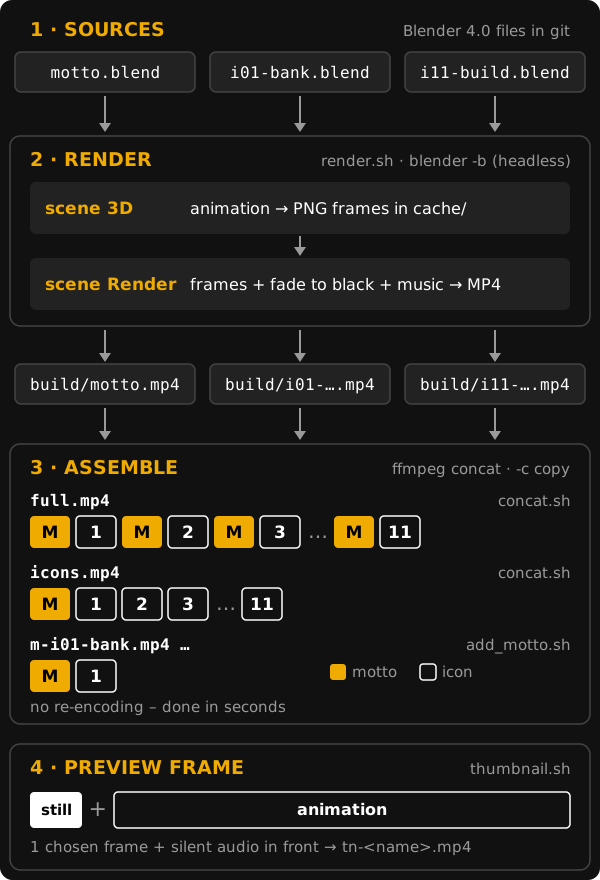
All videos of the set are made automatically, without opening an editor. Blender renders every part headless on a server in CI, ffmpeg assembles the parts into the final loops and adds a preview frame at the beginning.
- Client: FIT CTU in Prague
- Date: February 2024
- Style: 3DHologram
Parts instead of one long video
The set is not one long animation, but 12 independent parts – the motto and 11 icons – each
in its own Blender (4.0) file: motto.blend, i01-bank.blend … i11-build.blend.
All parts share the same format (1080 × 1080, 24 fps, the same codecs), the same timeline
and the same music, so they can be joined in any order. Changing one icon means rendering
only that one part again; the final videos are then assembled in seconds.
Render in two phases
Every .blend file contains two scenes and the script render.sh renders both
headless (blender -b), so it runs on a render server in a CI job as well as on a laptop:
for source; do
  blender -b "${source}" -S '3D' -a
  blender -b "${source}" -S 'Render' -o "${BUILD_PATH}/${source%.blend}.mp4" -a
done
- Scene 3D – the animation itself. It is rendered frame by frame into a cache directory as lossless PNG images.
- Scene Render – the video sequence editor. It takes the frames from the cache, adds the
final fade to black and the music, and encodes the video into
build/.
The paths are not hardcoded: BLENDER_PATH points to the Blender binary on the server
(by default /usr/local/blender/blender) and BUILD_PATH to the output directory
(by default build). Sources (.blend, fonts, music) are versioned in git; renders and
caches are build outputs and stay out of the repository.
Assembling the loops
All parts have identical streams, so ffmpeg joins them with the concat demuxer and stream
copy (-c copy) – no re-encoding, no quality loss, done in a moment. The list of files is
generated on the fly from the icons in the build directory:
# motto + icon1 + motto + icon2 + ...
ffmpeg -f concat -safe 0 \
  -i <(printf "file '$PWD/motto.mp4'\nfile '$PWD/%s'\n" i[0-9]*.mp4) \
  -c copy full.mp4

# motto + icons
ffmpeg -f concat -safe 0 \
  -i <(printf "file '$PWD/%s'\n" motto.mp4 i[0-9]*.mp4) \
  -c copy icons.mp4
concat.shmakes both final loops:full.mp4(the full version) andicons.mp4(the short version),add_motto.shputs the motto in front of every single icon (m-i01-bank.mp4…), for showing one industry on its own.
Adding a new icon is just adding a new i12-….blend file – the scripts pick it up by its name.
Preview frame
A video on a web page or a social network shows its first frame as a preview – and the
first frame of every part is almost black, with only a tiny cursor. The script
thumbnail.sh therefore puts a chosen frame in front of the video:
- Blender renders the single chosen frame of scene 3D as PNG (
-f <frame>), - ffmpeg makes a one-frame H.264 video from it,
- a silent stereo audio track is added (
anullsrc, 48 kHz), so that the preview has the same streams as the animation – without it the stream copy join would lose the sound, - the preview and the animation are joined with stream copy into
tn-<name>.mp4.
Technical details
- resolution 1080 × 1080, 24 fps, H.264 video
- black = unlit LEDs = transparent, main colour white, accent the FIT orange
#f0ab00 - font Technika (bold) of the CTU visual style
- music from the YouTube Audio Library: Mad Science (Sting) under the motto, Leavin (Sting) under the icons – its beginning repeated a few times to fit the length of an icon; the rhythm of the animation follows the music